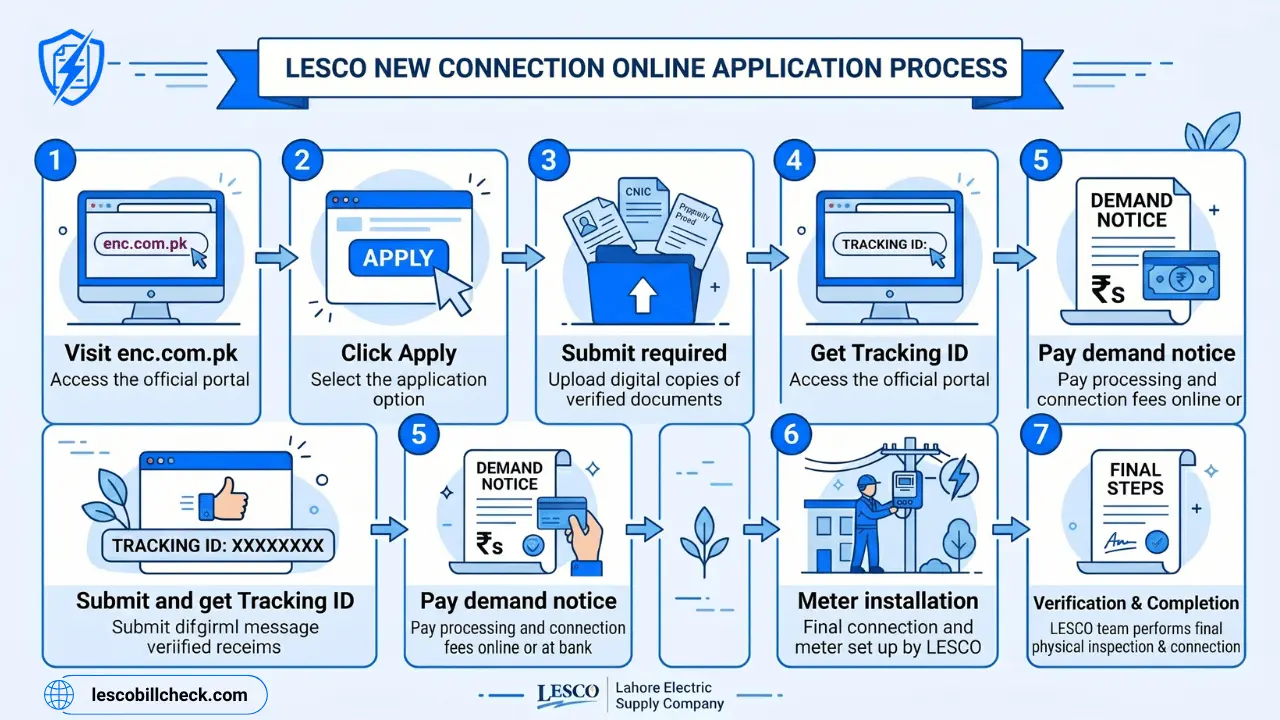
Do you need a new electricity connection for your new house, shop, or factory in Lahore, Kasur, Okara, Sheikhupura, or Nankana Sahib? Are you tired of searching for the right procedure? Don’t worry. This complete guide will walk you through everything about LESCO new connection – from online application to meter installation.
Getting a new electricity connection in Pakistan used to be a difficult task. You had to visit LESCO offices multiple times, wait in long queues, and deal with different officials. But now, the government has made the process easy through an online system called ENC (Electricity New Connection). You can now apply for a LESCO new connection from the comfort of your home.
What is LESCO New Connection System?
LESCO new connection system is an online portal launched by the Government of Pakistan under the Power Information Technology Company (PITC). This system allows consumers to apply for new electricity connections, change connection names, increase load, and change tariffs online.
The official website for LESCO new connection is: https://enc.com.pk
This portal is centralized for all electricity companies including LESCO, IESCO, GEPCO, MEPCO, PESCO, HESCO, SEPCO, QESCO, and TESCO. You can use the same portal for any electricity company in Pakistan.
Who Can Apply for LESCO New Connection?
Any person who meets the following requirements can apply for a LESCO new connection:
- You are a citizen of Pakistan with a valid CNIC
- You own a property or have legal permission from the property owner
- You have a valid proof of residence or property ownership
- You need electricity for domestic, commercial, industrial, or agricultural use
There are three main types of LESCO connections:
| Connection Type | Purpose | Load Range |
|---|---|---|
| Domestic | House, apartment, residential use | 1kW to 15kW |
| Commercial | Shop, office, restaurant, business | Varies by business type |
| Industrial | Factory, manufacturing unit | 15kW to 500kW+ |
| Agricultural | Tube wells, farming | Varies by land size |
Documents Required for LESCO New Connection
Before you start your LESCO new connection application, keep these documents ready. You will need to upload them online:
- CNIC Copy: Attested copy of your Computerized National Identity Card (both sides)
- Property Document: Fard, Registry, or File of the property where you want the connection
- Witness CNIC Copy: Attested CNIC copy of a witness (neighbor or family member)
- Neighbor’s Bill Copy: A recent electricity bill copy of your neighbor (for reference number)
- Wiring Test Report: Test report of wiring contractor (must be from an approved electrician)
- Applicant Undertaking: Signed agreement accepting LESCO terms and conditions
Important Note: All document file sizes should be less than 300 KB. If your files are larger, compress them before uploading.
Step by Step Guide to Apply for LESCO New Connection Online
Follow these steps carefully to apply for your LESCO new connection:
Step 1: Visit the ENC Official Website
Open your browser and go to https://enc.com.pk. This is the official Electricity New Connection portal for all Pakistani electricity companies.
Step 2: Click on “Apply” Button
On the left sidebar of the homepage, you will see an “Apply” button. Click on it to start your application.
Step 3: Select Your Company and Sub Division
A new page will open with four tabs:
- Select Company: Choose “LESCO” from the drop-down menu
- Sub Division: Select your area’s sub division (Faisalabad, Lahore, Kasur, etc.)
- Category: Choose your connection type (Domestic, Commercial, Industrial)
- Reference Number: Enter the reference number of your neighbor’s bill (any nearby consumer)
Step 4: Fill the Application Form
After entering the reference number, a detailed form will open. Fill in the following information carefully:
Personal Information:
- Connection type (Domestic / Commercial / Industrial)
- Status of ownership (Owner / Tenant)
- Your full name as per CNIC
- Father’s / Husband’s name
- Citizenship (Pakistani)
- CNIC number (without dashes)
- Mobile number (for SMS updates)
- Complete address with street, sector, and landmark
Premises Details:
- Number of meters already installed at the property (if any)
- Minimum load required (in kilowatts)
- Complete installation address
- Whether you want Green Meter or Net Metering (for solar system users)
Step 5: Upload Required Documents
Upload all the documents you prepared earlier. Make sure each file is less than 300 KB. The system accepts JPG, PNG, and PDF formats.
Step 6: Agree to Terms and Conditions
Read the terms and conditions carefully. Click on “I Agree” to give your undertaking. By clicking this, you confirm that all information provided is true and correct.
Step 7: Submit Your Application
Review all the information you have entered. If everything is correct, click the “Submit” button. Your LESCO new connection application is now submitted.
Step 8: Save Your Tracking ID
After successful submission, the system will generate a Tracking ID. This is a very important number. Write it down in a notebook or save it in your phone. You will need this Tracking ID to:
- Track your application status
- Download your Demand Notice
- Print your application form
- Communicate with LESCO about your application
How to Track LESCO New Connection Application Status?
After submitting your application, you can track its status online. Follow these steps:
- Visit the ENC website: https://enc.com.pk
- Click on “Track” button from the left sidebar menu
- Select Application Type: Choose “New Connection”
- Select Company: Choose “LESCO” from the drop-down menu
- Enter your Tracking ID (the one you saved after submission)
- Click the “Submit” button
Your application status will be displayed on the screen. The status can be one of these:
- Pending: Application received, waiting for verification
- Under Review: LESCO officials are checking your documents
- Demand Notice Issued: Your DN is ready to download and pay
- Approved: Your application is approved, meter will be installed soon
- Rejected: Your application is rejected (reason will be mentioned)
According to Epro.pk, your LESCO tracking ID is a temporary code used to monitor your new connection application on the PITC portal. It is different from your permanent reference number that you will get after meter installation.
LESCO New Connection Demand Notice (DN)
Once LESCO verifies your documents and approves your application, they will issue a Demand Notice (DN). This is a bill that shows the total fee you need to pay for your new connection. The Demand Notice includes:
- Security deposit amount
- Meter cost
- Installation charges
- Processing fee
- Taxes and duties
How to Print LESCO New Connection Demand Notice?
- Visit the ENC website: https://enc.com.pk
- Click on “Print DN” from the left sidebar menu
- Enter your Tracking ID
- Your Demand Notice will appear on the screen
- Click “Print” to take a printout
- You can also save it as PDF for future reference
How to Pay LESCO New Connection Demand Notice?
After printing your Demand Notice, you need to pay the amount. Here are the payment methods:
- Online Payment: On the ENC portal, click “Pay DN” and pay using your bank card or mobile wallet
- Bank Payment: Take your Demand Notice to any designated bank branch (Allied Bank, HBL, UBL, etc.) and pay in cash
- Mobile Wallet: Pay via JazzCash or EasyPaisa using the reference number on your DN
How to Upload Paid Demand Notice?
After paying the Demand Notice, you must upload the paid receipt to the portal:
- Click on “Upload DN” from the left sidebar menu
- Enter your Tracking ID
- Upload the scanned copy or photo of your paid Demand Notice receipt
- Click “Submit”
You should also submit a hard copy of the paid Demand Notice to your concerned LESCO sub-division office.
LESCO New Connection Charges and Fees 2026
The total fee for a LESCO new connection depends on the type of connection and the load you require. Here is an approximate breakdown:
| Connection Type | Load | Approximate Fee (PKR) |
|---|---|---|
| Single Phase (Domestic) | Up to 15kW | 15,000 – 35,000 |
| Three Phase (Domestic/Commercial) | 16kW – 70kW | 50,000 – 150,000 |
| Industrial (Small) | 71kW – 500kW | 150,000 – 500,000 |
Note: These are approximate charges. The exact amount will be mentioned in your Demand Notice. According to recent news, LESCO has raised new electricity connection fees significantly in 2026. Always check your official Demand Notice for accurate amounts.
Time Required for LESCO New Connection
The time required for a LESCO new connection depends on the category of your connection load:
Category 1 (Load up to 15kW – Domestic)
This includes most home connections. The total time required is approximately 30 days.
- Application submission and receipt: 1 day
- Site inspection: 3 days
- Cost estimation: 2 days
- Demand Notice delivery: 2 days
- Paid DN submission: 2 days
- Wiring test verification: 3 days
- Priority list preparation: 1 day
- Service order issuance: 3 days
- Equipment collection from store: 3 days
- Meter installation: 5 days
Category 2 (Load 16kW to 70kW – Commercial/Small Industrial)
This includes shops, offices, and small factories. The total time required is approximately 53 days.
Category 3 (Load 71kW to 500kW – Industrial)
This includes large factories and industrial units. The total time required is approximately 73 days.
How to Change LESCO Connection Name, Load, or Tariff?
Sometimes you may need to change the name on your existing LESCO connection (due to house sale, inheritance, or transfer). You may also need to increase your load or change your tariff type. The ENC portal also handles these requests.
Steps to Change Name, Load, or Tariff:
- Visit https://enc.com.pk
- Click on “Change” from the left sidebar menu
- Select the application type:
- Change of Name
- Change of Load
- Change of Tariff
- Enter your existing reference number (from your LESCO bill)
- Enter your CNIC number and mobile number
- Fill in the new details (new name, new load, or new tariff)
- Upload required documents:
- Attested CNIC copy of the applicant
- Current electricity bill copy
- Proof of ownership (for name change)
- Submit the application
- Save the Tracking ID for future reference
After verification, LESCO will issue a Demand Notice for the applicable fee. Pay the DN, and your changes will be applied to your connection.
LESCO New Connection – Frequently Asked Questions (FAQs)
What is the process of obtaining a new electricity connection in Lahore?
Visit enc.com.pk, select LESCO, fill the online application form, upload required documents, submit, pay the Demand Notice, and wait for meter installation. The process takes 30 to 73 days depending on load.
How to check the status of a new connection application?
Visit enc.com.pk, click on “Track”, enter your Tracking ID, and your application status will be displayed.
Is it necessary to submit a hard copy to the office?
Yes, after submitting your online application, you must submit a printed copy of your application along with all documents to your concerned LESCO sub-division office.
In which bank should I make the payment for the Demand Notice?
You can pay at any designated bank branch including Allied Bank, HBL, UBL, National Bank, or online through the ENC portal payment option.
Who can attest my documents?
Your documents must be attested by a government officer (Grade 17 or above), a notary public, or a lawyer registered with the bar council.
How much is the Demand Notice fee?
The fee varies by connection type and load. You will see the exact amount on your Demand Notice after application verification.
How to print Demand Notice?
Visit enc.com.pk, click on “Print DN”, enter your Tracking ID, and your Demand Notice will appear. Click print to take a printout.
What is the typical timeframe for getting a new connection?
30 days for domestic connections (up to 15kW), 53 days for commercial (16-70kW), and 73 days for industrial (71-500kW).
Can we track our change-of-name application online?
Yes, use the same “Track” option on the ENC portal and enter your Tracking ID to check the status of your name change application.
What is the LESCO new connection tracking ID?
The tracking ID is a temporary code given by the ENC system after application submission. Use it to track your application online.
Tips for a Smooth LESCO New Connection Process
- Double-check all information before submitting your application. Any mistake can cause delays.
- Keep your documents ready in digital format (scanned or clear photos) before starting the application.
- Make sure file sizes are under 300 KB. Use online compression tools if needed.
- Save your Tracking ID in multiple places – phone, notebook, and email.
- Pay your Demand Notice quickly after it is issued. Delayed payment delays your meter installation.
- Visit your LESCO sub-division office if your application is stuck for more than 15 days.
- Call LESCO helpline 118 if you face any technical issues with the online portal.
Conclusion
Getting a LESCO new connection is now easier than ever thanks to the ENC online portal. You no longer need to visit LESCO offices multiple times or deal with agents. The entire process – from application to meter installation – can be tracked online from your home.
Remember the key steps:
- Visit enc.com.pk
- Fill the online application form
- Upload required documents (under 300 KB)
- Save your Tracking ID
- Pay the Demand Notice when issued
- Wait for meter installation (30-73 days)
Don’t wait any longer. Apply for your LESCO new connection today and get reliable electricity for your home or business.
Was this guide helpful? Share it with your friends and family who need a new LESCO connection in Lahore, Kasur, Okara, Sheikhupura, or Nankana Sahib.